Axon Hub — Brookhaven Script | Fly, Noclip, ESP, Vehicles
Script
Copy this and run it in your executor.getgenv().Provider = "rscript"
loadstring(game:HttpGet("https://api.luarmor.net/files/v3/loaders/97c3f6db55a2cf72141537a85458e5a7.lua"))()- 1Hit Copy on the box above.
- 2Open your Roblox executor and join the game.
- 3Paste the script and press Execute.
- 4Grab a key from the key system if prompted.
Axon Hub — Brookhaven RP Script 🏠
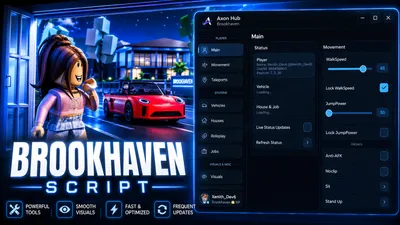
🚗Fly around the map, spawn and tune any vehicle, claim houses, run ESP, teleport anywhere, and roleplay smarter with Axon Hub for Brookhaven. This script includes fly, noclip, infinite jump, click teleport, a full ESP suite, vehicle spawning and customization, house and lot claiming, job tools, roleplay customization, player tools, and a clean UI with saved configurations.Axon Hub is built for Brookhaven players who want powerful utility and visuals while keeping everything simple, fast, and easy to control.
🛠️ Main Features
🎮 Player
- Live status (player, vehicle, house & job)
- Walk
- Speed slider + lock
- Jump
- Power slider + lock
- Anti-AFKNoclip
- Sit / Stand Up
- Reset Character
- Config save/load system
🪽 Movement
- Fly with adjustable speed
- Infinite Jump
- Click-to-Teleport
- Low Gravity with gravity slider
- Custom keybinds (Fly, Noclip, Click-TP)
📍 Teleports
- Teleport to any public area
- Load all public areas
- Save & return to position
- Custom waypoints (save / teleport / delete)
- Area object scanner with adjustable radius
🚗 Vehicles
- Spawn any vehicle
- Bring / unstuck your vehicle
- Teleport to or despawn your vehicle
- Max speed control
- Vehicle paint & color
- Underglow styles + underglow color
- Custom license plate
- Drift strength & turbo tuning
- Toggle headlights, hazards, emergency lights, siren, engine smoke, music, lock & horn
🏠 Houses
- View, teleport to & unclaim your house
- Scan available lots
- Teleport to & claim any open lot
🎭 Roleplay
- Get public items / tools
- Play & stop emotes
- Load saved outfits
- Reset appearance
- Teleport to clothing racks
- Set RP name & bio with custom colors
- Body size up / down
💼 Jobs
- Teleport to any job station
- Take a job instantly
- Current job info
- 👁️ Visuals & ESPPlayer, Vehicle, House/Lot, Job & Item ESPNames, distance, through-walls & tracers
- Adjustable fill / outline transparency & max distance
- Custom ESP colors per category
- Fullbright & No Fog
- Freecam with speed control
- Field of View slider
- Lock Time of Day
🧑
🤝
🧑 Players
- Player list with copy name / User
- Id
- Teleport near player
- Spectate player
- Highlight player
⚙️ Settings
- Config save/load system
- Interface settings
- Copy diagnostics
- Re-scan game data
- Clean Axon Hub UIRight
- Shift to toggle menu
📋 How to UseCopy the script from the Script tab.Open your Roblox executor.Join Brookhaven 🏡 RP.Paste and execute the script.Press RightShift to toggle the UI.Enable the features you want, such as Fly, Noclip, ESP, Vehicle Spawner, House Claimer, or Teleports.
⚠️ NotesClick-to-Teleport teleports you to wherever you left-click.ESP supports players, vehicles, houses, jobs and items with custom colors.Vehicle customization (paint, underglow, plate, drift, turbo) requires you to be in or have spawned a vehicle.Lot claiming only works on open, unclaimed lots.Use moderate fly/freecam speeds for smoother movement.[[
🏠 RELEASE] BrookhavenExplore more scripts for this game](https://rscripts.net/game/brookhaven)